GRAPHQL and MQTT INTERGRATER-AVATAR
PREREQUISITE
GraphQL in NestJS
- GraphQL offers a more efficient and flexible approach than traditional REST APIs for querying and manipulating data.
Introduction
This document explains the SubscriberResolver class, part of our NestJS application, focusing on its integration of GraphQL and MQTT for managing subscriber data.
Code Structure
- SubscriberResolver: A class handling GraphQL operations related to
Subscribers. - MQTT Integration: Using
nest-mqttfor listening to MQTT topics. -
Services: Business logic is encapsulated in the
SubscriberService. -
Key Terms:
- Broker: The server that handles MQTT messages.
- Topic: A string that the broker uses to filter messages for each connected client.
Process Explanation:
Connecting to the MQTT Broker:
- The
SubscriberResolverclass uses thenest-mqttmodule to establish a connection with the central MQTT broker. - The connection details, such as the broker's URL and authentication credentials, are typically configured in the application settings.
Subscribing to MQTT Topics:
- The
SubscriberResolversubscribes to specific MQTT topics (e.g.,dt/#) using the@Subscribedecorator. This subscription is managed through the connection established with the central MQTT broker. - When a message is published on these topics, the broker routes the message to the
SubscriberResolver.
Processing MQTT Messages:
- Upon receiving a message, the
SubscriberResolverinvokes themqttSubscribemethod. - This method processes the incoming MQTT message, possibly altering subscriber data. It does so by calling a method in the
SubscriberService, which contains the logic for handling these messages.
GraphQL Operations Integration:
- The GraphQL interface allows users to perform queries and mutations concerning subscribers.
- Queries might include fetching all subscribers or a specific subscriber, while mutations could be creating, updating, or deleting a subscriber.
- These GraphQL operations are handled by the
SubscriberResolver, which interacts with theSubscriberServiceto perform the necessary data manipulation or retrieval. - The
SubscriberServicecould be interacting with a database to persist or retrieve subscriber data.
For the Queries and Mutations of the GraphQL Operation Intergration
- Queries:
getAllSubscribers: Fetches all subscribers with optional search and filter capabilities.getSpecificSubscriber: Retrieves a single subscriber by ID.
- Mutations:
createSubscriber: Adds a new subscriber.updateSubscriber: Updates an existing subscriber.deleteSubscriber: Removes a subscriber from the system.
Central MQTT Broker Role:
- Message Broker: Acts as the central system for message exchange between clients. In this context, it handles the MQTT messages that are relevant to subscriber data.
- Real-time Data Handling: The broker plays a crucial role in real-time data communication, making it essential for scenarios where subscriber data changes frequently and needs immediate reflection in the application.
Security and Interceptors
- The use of
JwtAuthGuardandAuthInterceptorensures that the API is secure and that requests are processed correctly.
Resolving Fields
- The
@ResolveFielddecorator is used to resolve complex fields, like linking a subscriber to its broker.
1. Decorators and Class Declaration
typescriptCopy code
@UseGuards(JwtAuthGuard)
@UseInterceptors(AuthInterceptor)
@Resolver((of) => Subscriber)
export class SubscriberResolver {
  constructor(private subscriberService: SubscriberService) {}
  ...
}
@UseGuards(JwtAuthGuard): This decorator applies a guard to the class, which in this case isJwtAuthGuard. It ensures that the routes handled by this resolver are protected by JWT authentication. Only authenticated users can access these routes.@UseInterceptors(AuthInterceptor): This decorator applies an interceptor to all routes within the class. TheAuthInterceptorcould be used for tasks like logging requests, transforming response data, or handling errors.@Resolver((of) => Subscriber): This decorator declares the class as a GraphQL resolver for theSubscriberentity. It enables the class to handle GraphQL queries and mutations related toSubscribers.-
constructor(private subscriberService: SubscriberService): The constructor injectsSubscriberService, allowing the resolver to utilize its methods for business logic, such as interacting with a database or external services. -
MQTT Subscription:
- The
@Subscribedecorator marks themqttSubscribemethod to listen to MQTT messages on specified topics (dt/#). - When a message is published on these topics, the
mqttSubscribemethod processes it usingsubscriberService.
- The
@Subscribe({
    topic: 'dt/#',
    // transform: payload => payload.toString(),
})
async mqttSubscribe(@Payload() payload, @Topic() topic: string) {
  try {
    return await this.subscriberService.processMqttMessage(topic, payload);
  } catch (error) {
    console.log(error, 'this my eror leon lishenga');
  }
}
@Subscribe: This decorator configures the method to subscribe to MQTT topics. In this case, it subscribes to any topic that matches the patterndt/#, indicating a hierarchical topic structure.mqttSubscribe: This is an asynchronous method that gets triggered when a message is published to a subscribed topic. It takes two arguments:@Payload() payload: The payload of the MQTT message.@Topic() topic: The MQTT topic on which the message was published.
-
Inside the method,
subscriberService.processMqttMessageis called to handle the message, followed by error handling. -
GraphQL Queries :
Fetching All Subscribers
@Query((returns) => GetAllSubscribersResponse)
async getAllSubscribers(
@Args() args: ConnectionArgs,
@Args({ name: 'search', nullable: true }) search: string,
@Args({
name: 'filters',
type: () => GetAllSubscribersInput,
nullable: true,
})
filters: GetAllSubscribersInput,
) {
return await this.subscriberService.getAllSubscribers(args, search);
}
@Query: Declares a GraphQL query. This query fetches all subscribers, with the return type specified asGetAllSubscribersResponse.args: ConnectionArgs: These are arguments for pagination (like limit, offset).search: string: An optional search string to filter the subscribers.filters: GetAllSubscribersInput: Additional filters for querying subscribers.- The method invokes
subscriberService.getAllSubscribersto fetch the data.
Fetching a Specific Subscriber
@Query((returns) => Subscriber)
async getSpecificSubscriber(@Args('id') id: string) {
return await this.subscriberService.getSubscriber(id);
}
- This query retrieves a single subscriber by their ID.
@Args('id'): The argument specifies the subscriber's ID to fetch.- The
subscriberService.getSubscribermethod is used to retrieve the specific subscriber.
4. GraphQL Mutations
Creating a Subscriber
typescriptCopy code
@Mutation((returns) => Subscriber)
async createSubscriber(
  @Args('createSubscriberInput') createSubscriberInput: CreateSubscriberInput,
) {
  return this.subscriberService.createSubscriber(createSubscriberInput);
}
@Mutation: Declares a GraphQL mutation for creating a new subscriber.createSubscriberInput: CreateSubscriberInput: The input object containing data needed to create a new subscriber.- Calls
subscriberService.createSubscriberwith the provided input to add the new subscriber.
Updating a Subscriber
typescriptCopy code
@Mutation((returns) => Subscriber)
async updateSubscriber(
  @Args('updateSubscriberInput') updateSubscriberInput: UpdateSubscriberInput,
) {
  return await this.subscriberService.updateSubscriber(updateSubscriberInput);
}
- This mutation updates an existing subscriber's details.
updateSubscriberInput: UpdateSubscriberInput: Contains the updated data for the subscriber.- Utilizes
subscriberService.updateSubscriberto perform the update.
Deleting a Subscriber
typescriptCopy code
@Mutation((returns) => String)
async deleteSubscriber(@Args('subscriberId') subscriberId: string) {
5. Field Resolver
typescriptCopy code
@ResolveField('broker', (returns) => Broker, { nullable: true })
async getItem(@Parent() sub: Subscriber) {
    return sub.broker == null ? null : await this.subscriberService.getBroker(sub.broker._id);
}
@ResolveField('broker', (returns) => Broker, { nullable: true }): This decorator is used for defining a field resolver. In this case, it resolves thebrokerfield of aSubscriberentity. Thereturnsclause indicates that the resolved field will be of typeBroker, and it's marked asnullable, meaning the field can benull.async getItem(@Parent() sub: Subscriber): The methodgetItemis used to resolve thebrokerfield. The@Parent()decorator indicates that the argumentsubis the parent object in the GraphQL query, which in this context is aSubscriber.- The method checks if the
brokerfield of theSubscriber(sub.broker) isnull. If it is notnull, it then callssubscriberService.getBroker(sub.broker._id)to fetch theBrokerentity associated with the subscriber. This is typically used when the relationship betweenSubscriberandBrokeris not directly loaded in the initial query, and additional data fetching is needed to resolve this field.
Explanation of Field Resolver
Field resolvers in GraphQL are used for resolving fields that are not directly stored in the entity but need some form of computation or fetching from other sources. In this case, the field resolver getItem is used to fetch the Broker entity associated with a Subscriber.
When a GraphQL query requests a Subscriber and includes the broker field in the selection set, this field resolver is invoked to provide the Broker data. This approach is particularly useful in managing relationships and dependencies between different entities in a GraphQL schema, allowing for more flexible and efficient data retrieval.
5. Services and Dependency Injection in NestJS
In the provided code snippet, the concept of Services and Dependency Injection (DI) is a central aspect of NestJS's architectural design. Let's delve into how these concepts are applied in the context of your application.
Explanation of Services in NestJS
- Services: In NestJS, services are typically used to encapsulate the business logic of an application. They are responsible for data handling, such as interacting with a database, performing computations, and implementing the application's core functionalities. Services in NestJS are usually classes annotated with
@Injectable()decorator, making them a part of NestJS's dependency injection system. - Role in Application: In your code, the
SubscriberServiceis a service that likely contains logic for managingSubscriberentities. This can include operations like creating, retrieving, updating, and deleting subscribers, as well as processing MQTT messages.
Example of a Service
typescriptCopy code
@Injectable()
export class SubscriberService {
  // Service methods and properties here
  ...
}
Dependency Injection (DI) in NestJS
- Dependency Injection: DI is a design pattern in which a class requests dependencies from external sources rather than creating them. In NestJS, DI is achieved through the constructor of a class, where dependencies are provided by the NestJS IoC (Inversion of Control) container.
- Benefits: DI decouples the creation of a dependency from the class that uses it, leading to more modular, testable, and maintainable code.
Application of DI in Provided Code
In your code, the SubscriberResolver class injects the SubscriberService through its constructor. This is a clear example of DI.
Example of Dependency Injection
typescriptCopy code
@Resolver((of) => Subscriber)
export class SubscriberResolver {
  constructor(private subscriberService: SubscriberService) {}
  ...
}
- Here,
SubscriberServiceis injected intoSubscriberResolver. Theprivatekeyword in the constructor not only declaressubscriberServiceas a class property but also marks it as a dependency to be injected. - When
SubscriberResolveris instantiated, NestJS automatically provides an instance ofSubscriberServiceto it.
Summary of DI (Dependency Injection) in the Code
- Service Used:
SubscriberService. - Injected Into:
SubscriberResolver. - Purpose: To handle business logic related to subscribers and MQTT message processing, thereby separating concerns and enhancing code maintainability.
THE DIAGRAM BELOW EXPLAINS THE WHOLE PROCESS
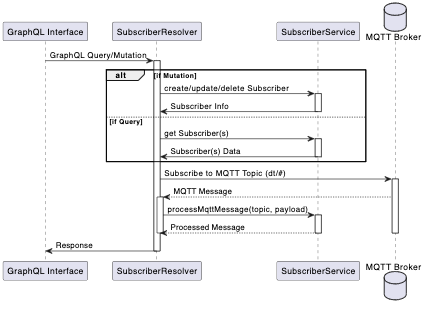
Explanation of the Diagram:
- GraphQL Interface: Represents the entry point for GraphQL queries and mutations.
- SubscriberResolver:
- Receives queries and mutations from the GraphQL interface.
- Subscribes to MQTT topics (
dt/#). - Receives MQTT messages from the MQTT broker.
- SubscriberService:
- Processes business logic for creating, updating, deleting, or retrieving subscribers.
- Handles processing of MQTT messages received by
SubscriberResolver.
- MQTT Broker: Manages MQTT messages and sends them to
SubscriberResolver
In summary, your code demonstrates a typical use of services and dependency injection in a NestJS application, adhering to principles of clean architecture and separation of concerns. This pattern not only simplifies unit testing by allowing mock implementations of services to be easily injected but also enhances the overall maintainability and scalability of the application.