Emqx-ACL
Introduction
This document describes how EMQX delegates MQTT client authentication and per-topic ACL enforcement to an external HTTP service. You’ll see:
- What the HTTP service must return
- How EMQX calls and consumes that response
- A sequence diagram illustrating the interaction
- Dashboard configuration and client usage
- Troubleshooting tips
Data Flow Overview
Before diving into configuration details, here’s a high-level view of the runtime flow:
- An MQTT client attempts to CONNECT to EMQX with a username/password.
- EMQX issues an HTTP POST to your
/emqx-authendpoint, passing those credentials. - Your service validates the user and returns a flat JSON including
resultand anaclarray. - EMQX reads
resultto accept or reject the connection, and—on success—applies each ACL entry as a topic filter. - The client then issues SUBSCRIBE calls, which EMQX authorizes against the installed ACLs.
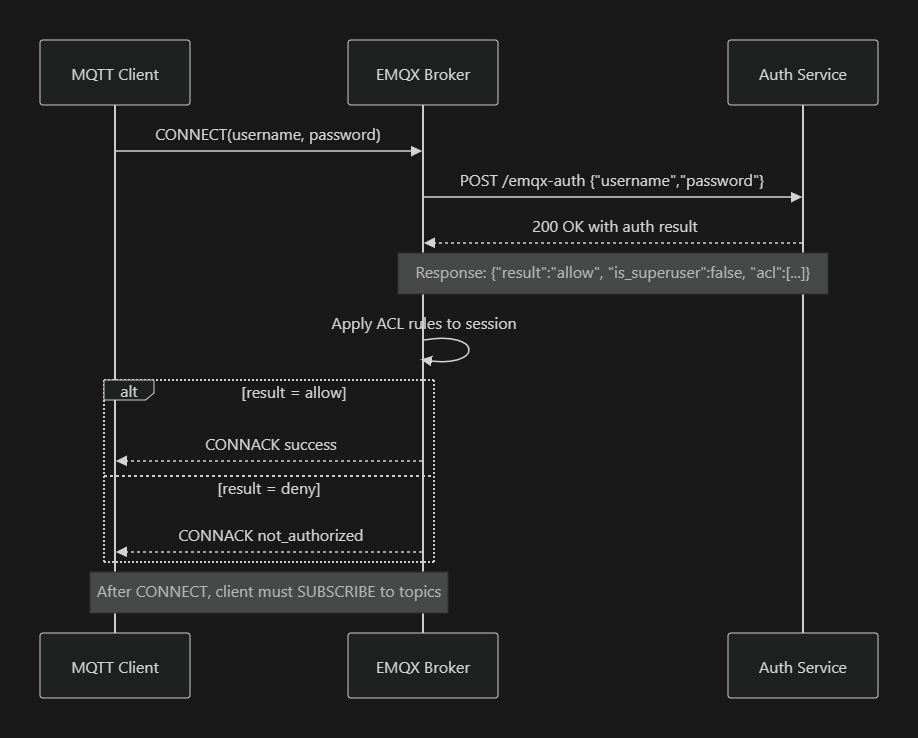
Backend Response Format
Your /emqx-auth endpoint must return HTTP 200 and a JSON object at its root:
{
  "result":       "allow",        // or "deny"
  "is_superuser": false,          // true for superadmin
  "acl": [
    {
      "permission": "allow",      // "allow" or "deny"
      "action":     "all",        // "publish"|"subscribe"|"all"
      "topic":      "dt/V01/GPRSV2/+/VCUA/#"
    },
    {
      "permission": "allow",
      "action":     "all",
      "topic":      "cmd/V01/GPRSV2/+/VCUA/#"
    }
  ]
}
resultcontrols CONNECT approval.aclentries drive EMQX’s per-session topic filters.
EMQX Dashboard Setup
- Disable any HTTP entries under Access Control ▶ Authorization.
-
Create a new HTTP AuthN under Access Control ▶ Authentication:
- Mechanism: Password‐Based
- Backend: HTTP Server
- Method:
POST - URL:
- Bridge:
http://172.17.0.1:3010/emqx-auth - Host-networked:
http://127.0.0.1:3010/emqx-auth
- Bridge:
- Headers:
Content-Type: application/json -
Body (raw JSON):
{
  "username": "${username}",
  "password": "${password}"
}
-
Save and toggle the entry ON.
MQTT Client Usage
After a successful CONNECT (CONNACK), the client must explicitly subscribe to its allowed topics:
mosquitto_sub \
  -h <EMQX_HOST> \
  -u username@example.com \
  -P theirPassword \
  -t 'dt/V01/GPRSV2/+/VCUA/#'
Or in code:
client.subscribe('dt/V01/GPRSV2/+/VCUA/#', (err, granted) => {
  console.log(granted);
});
Troubleshooting
| Symptom | Cause & Fix |
|---|---|
| health_check_failed / Connection refused | EMQX’s GET health-check is failing. Ensure your service listens on 0.0.0.0:3010 and add a GET /emqx-auth returning HTTP 200. |
| not_authorized | Endpoint returned non-200 or result:"deny". Verify @HttpCode(200) on your POST handler and the JSON contains result:"allow". |
| No messages after SUBSCRIBE | Make sure you subscribe to the exact topic filters returned in the acl array. |
With this configuration, EMQX will enforce exactly the per-topic permissions your HTTP service provides, and clients will only see the topics you allow.